Toolchain B
Fusion and ShopSabre routers.
Machine Information
The machine is a ShopSabre RC8. It uses *.tap files, which are just plaintext GCODE. Tech support is available from the company on the machine's desktop and is pretty good.
Machine Procedures
Startup
- Power on computer and control box.
- Login to computer with password
makemakemake. - Ensure shop compressor is on.
-
Cold means the machine has not run for two or more hours. Run the warmup cycle if the machine is "cold". -
If rails are dry, they need to be greased. See other process. Check that gantry rails are not dry. - Load workpiece onto the vacuum table.
- Turn correct number of vacuum engines on.
- Install tool into collet.
- Set tool height via button (one-click fully automatic).
-
This is stored in a drawer and plugs into the spindle head. Use auxiliary z-probe to set Z work zero. - Jog and set XY work zero.
- Load
CGODEinto machine. - Install dust shoe.
- Crank dust collector handle to shake filter free.
- Ensure dust barrel is not full.
- Turn on dust collector.
- Run job.
Shutdown
- Turn off the vacuum table.
- Remove the work.
- Sweep most sawdust off the machine.
- Then vacuum off the machine.
- Turn off the dust collector.
- Rapid the gantry back to near-home position.
- Shut off power to the CNC control box.
Machine Rail Greasing
- Retrieve grease gun from drawer.
- Apply grease to all grease points. There are four per rail.
Safety
A few safety guidelines:
- Don't get too close to the machine while it's running.
- Stay nearby the whole run for new programs. It's more ok to leave when a repeat-program running.
- Take care – a fire has already happened once.
- Escape key on keyboard functions as E-Stop.
Fusion and ShopSabre
The RC8 evidently is compatible with WinCNC-type GCODE (e.g. the *.tap file). Fusion ships with a post-processor that's good for this:
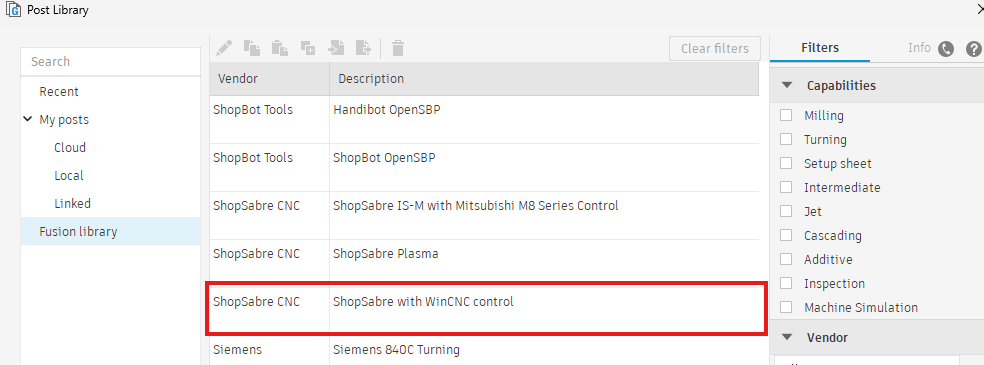
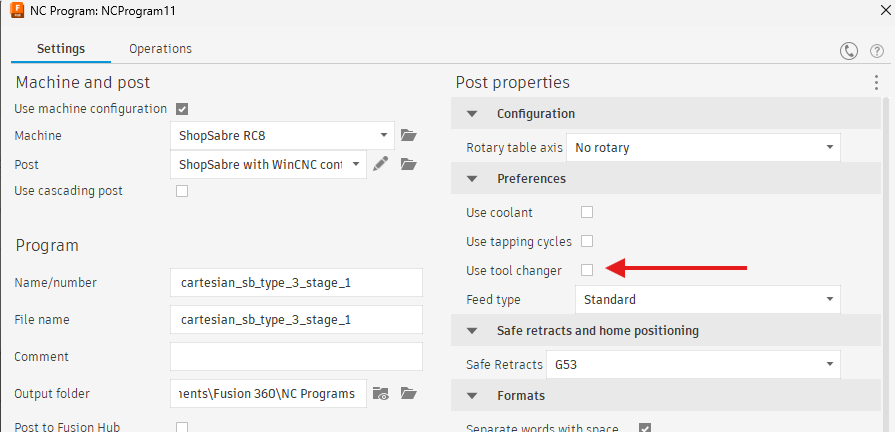
This post-processor has numerous configuration options. I haven't played with most of them, but I have determined that the tool change option (which is enabled by default) must be disabled or the ShopSabre control software will reject the resulting tap file.
The Vacuum Table
The RC8 comes equipped with a vacuum table that is effectively the sole means of workholding. The table is driven by a large vacuum pump that has four individually controllable motors. The table's surface is divided into four slices that correspond in space with the aluminum T-slots along the side. These slices can be turned on and off by valves on the front of the machine depending on where the work winds up laying.
The appropriate number of vacuum motors should be turned on to apply full pressure to the work on the table. This is something of an art. If too many are on, the sound produced will have a 'warble' to it.
Control Software
The controller has several useful features:
- It keeps track of machine location and will not allow the tool to pierce the vacuum bed
It will, however, piece the spoilboard or let the gantry slam into the ends of the rails. - There are 'preset' locations that the head can be sent to rapidly for convenience. One for home, one at the far end the bed for cleaning, one for tool change, &c).
- The program path simulator grid will show paths in red that break the envelope machine envelope, which allow the operator to check whether a part will be ruined by overflow (even if the machine would save itself).
Fourth Axis
Misc
It's 6.21" from the spindle centerline to the front face of the X-Axis rails.